Turn any song into a light show for your car
Paste a YouTube link or drop in a song. MyLightShow listens to the music, choreographs your car's lights, mirrors and more — and lets you watch it on a live preview before it ever touches a USB stick.
One-time price, no subscription · Your music stays on your Mac · Built for Model 3, Y, S, X and Cybertruck
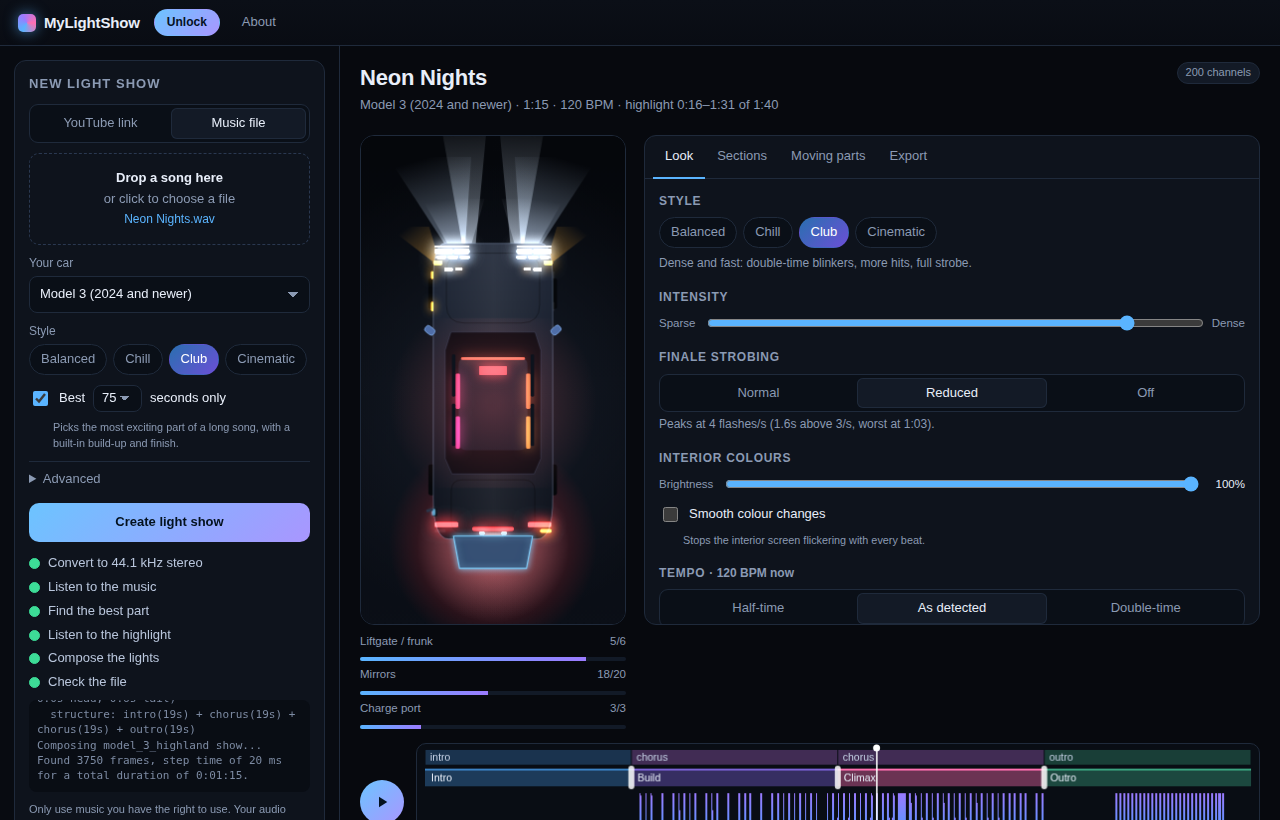
This is the real preview from the app, playing a generated demo track.
Three steps, a couple of minutes
No sequencing software, no timelines to drag around by hand — unless you want to.
Pick the music
Paste a YouTube link or drop in an MP3, M4A, WAV or FLAC. Choose your car and a style: Balanced, Chill, Club or Cinematic.
Watch and tweak
The show plays on a live top-down preview. Change the style, intensity or strobing, drag the build-up and the big finish, switch moving parts off — it re-composes instantly.
Copy to USB
One click writes a verified copy to your stick in the right folder with the right names. Plug it into the car and start the show.
Made to be better than “pick the beats and flash”
It follows the song's structure — quiet intro, building verses, a real climax — and uses everything your car can do.
Live preview
Every light and moving part, synced to the music, scrubbable. See the show before you drive anywhere.
Styles and intensity
Four looks, an intensity slider, finale strobing Normal / Reduced / Off, and a brightness cap so the interior screen doesn't flicker.
Section editor
See intro, build, climax and outro on the timeline. Drag the climax where you want it, or pick any detected section.
Safety built in
Lights-only mode, per-part switches for mirrors, liftgate, charge port and doors, live budget meters, and warnings for fast flashing.
Best 75 seconds
Got a 5-minute track? One tick picks the most exciting 60–90 seconds, with a proper build-up and a clean finish.
Careful USB export
Spots sticks the car can't read, copies and verifies every byte, tidies Mac leftovers, and ejects when it's done.
Share a video
Render the preview to a vertical video with the song's audio — ready for Reels, TikTok and Shorts.
Check any show
Import a show from anywhere to check it for problems, see what it moves and preview it.
Private
Analysis happens on your Mac. Your music never goes to a server — the only thing online is the YouTube download itself.
Early-bird pricing that only goes up
The price starts at $1 and rises $1 every 5 licences, up to $10. Buy now and you pay today's price — once.
Loading the current price…
- Unlocks the full MyLightShow app on one Mac
- All styles and all supported cars
- One licence = one Mac (Apple Silicon)
- Key arrives instantly on screen and by email
- 14-day money-back guarantee
Secure checkout by Dodo Payments (Merchant of Record). We never see your card.
Try before you buy
Download the app, then unlock it with a licence key. One key works on one Mac — paste it under Unlock after you buy.
Already bought?
Open the app, click Unlock and paste your key. Can't find it? Get it emailed again.
Questions
Which cars does it work with?
MyLightShow writes the standard light-show files that a car's built-in Light Show feature plays from a USB stick. It has settings for Model 3 (including the 2024+ refresh with interior accent lights), Model Y, Model S, Model X and Cybertruck. Your car needs that feature and reasonably recent software.
Is my music uploaded anywhere?
No. Everything is analysed on your Mac. The only network use is downloading audio from a YouTube link you paste, and checking the current price.
Is downloading from YouTube allowed?
That depends on the video, the music and where you live. YouTube's terms generally don't allow downloading, and most music is copyrighted. Only use audio you have the right to use — or use a music file you own instead of a link. You are responsible for what you download.
Will it move my car?
Only if you let it. Shows can fold mirrors, open the liftgate or frunk, flip the charge port and swing doors. Every one of those can be switched off (“Lights only”), and the app shows exactly what a show will move. Always run shows parked, with clear space around the car.
Can the lights flash dangerously?
The app measures fast flashing in every show and warns you. The finale strobe can be set to Normal, Reduced (under 3 flashes a second) or Off, and new shows default to Reduced. If anyone nearby may be sensitive to flashing lights, choose Off.
What do I need to run it?
A Mac running macOS 12 or later. An internet connection is only needed for YouTube downloads and checking the price. A USB stick formatted exFAT or FAT32 to carry shows to the car.
Windows? iPhone?
Mac only for now.
What if it doesn't work for me?
Email [email protected] within 14 days for a full refund, no questions asked. See the refund policy.